CLASS
Follow the step by step instructions in the Mr. Komar Shared Folder under the Exercise 12 folder to see how to set up iMovie to work on your mac.
Note - you need to set it up on your machine under your name -- even if you are in a group. Once you set it up, you will not be able to move computers because it is set up on the hard drive.

Thursday, March 5, 2015
Exercise 12 - Music Video Filming and Editing
Class:
Here is a breakdown on the dates and grading rubric for the music video project:
Points : Dates : Tasks
100 points : 3/2 - 3/3 : Form groups, choose song, create and turn in production notes
(10 points for maturely grouping, 20 points for choosing a good song, 70 points for notes)
100 points: 3/4 - 3/10 : Film
(10 points for maturely checking out camera, 50 points for actively filming, 40 points for downloading video to computer)
100 points: 3/4 - 3/12 (and after spring break) : Put film into iMovie and put to music.
(100 points for putting clips together and having a sound track to accompany)
Here is a breakdown on the dates and grading rubric for the music video project:
Points : Dates : Tasks
100 points : 3/2 - 3/3 : Form groups, choose song, create and turn in production notes
(10 points for maturely grouping, 20 points for choosing a good song, 70 points for notes)
100 points: 3/4 - 3/10 : Film
(10 points for maturely checking out camera, 50 points for actively filming, 40 points for downloading video to computer)
100 points: 3/4 - 3/12 (and after spring break) : Put film into iMovie and put to music.
(100 points for putting clips together and having a sound track to accompany)

Sunday, March 1, 2015
Exercise 12 - Your Own Music Video
Welcome to the VIDEO section of the year.
You will be grouped together with others to make a music video.
Song Selection day. Instructor will play each song and project the song lyrics (if any) for the class. Students will listen to each song and take notes using handout “CMT Music Video Song Notes”. Your notes should include mood of song, tempo, any possible ideas for scenes, their reaction to the song, etc.
You decide which songs you would like to select. Each group must have a different selection. If there is time remaining, groups can begin brainstorming video ideas.
If you have a song that you would like to include -- you may put that as your selection (just make sure it is TUSD "safe" with no profane language or content).
Due TODAY Your group notes showing who is in your group, your song and your production notes.
You will be grouped together with others to make a music video.
Song Selection day. Instructor will play each song and project the song lyrics (if any) for the class. Students will listen to each song and take notes using handout “CMT Music Video Song Notes”. Your notes should include mood of song, tempo, any possible ideas for scenes, their reaction to the song, etc.
You decide which songs you would like to select. Each group must have a different selection. If there is time remaining, groups can begin brainstorming video ideas.
If you have a song that you would like to include -- you may put that as your selection (just make sure it is TUSD "safe" with no profane language or content).
Due TODAY Your group notes showing who is in your group, your song and your production notes.
Wednesday, February 18, 2015
Exercise 11 - Garageband loop mix
25 Points
Submit an MP3 15seconds max!
Your teacher will come around and give you 10 points for a cleaned up computer. All files you need in the Documents folder and all files cleaned off of the Desktop/Download folder.
Your teacher will also give you 10 points for updating your "website".
You will experiment with Garageband to make your own 15 second MP3 music.

 Step 1: Open Garageband. Choose any of the projects but I will show you how to do "Hip Hop" choice.
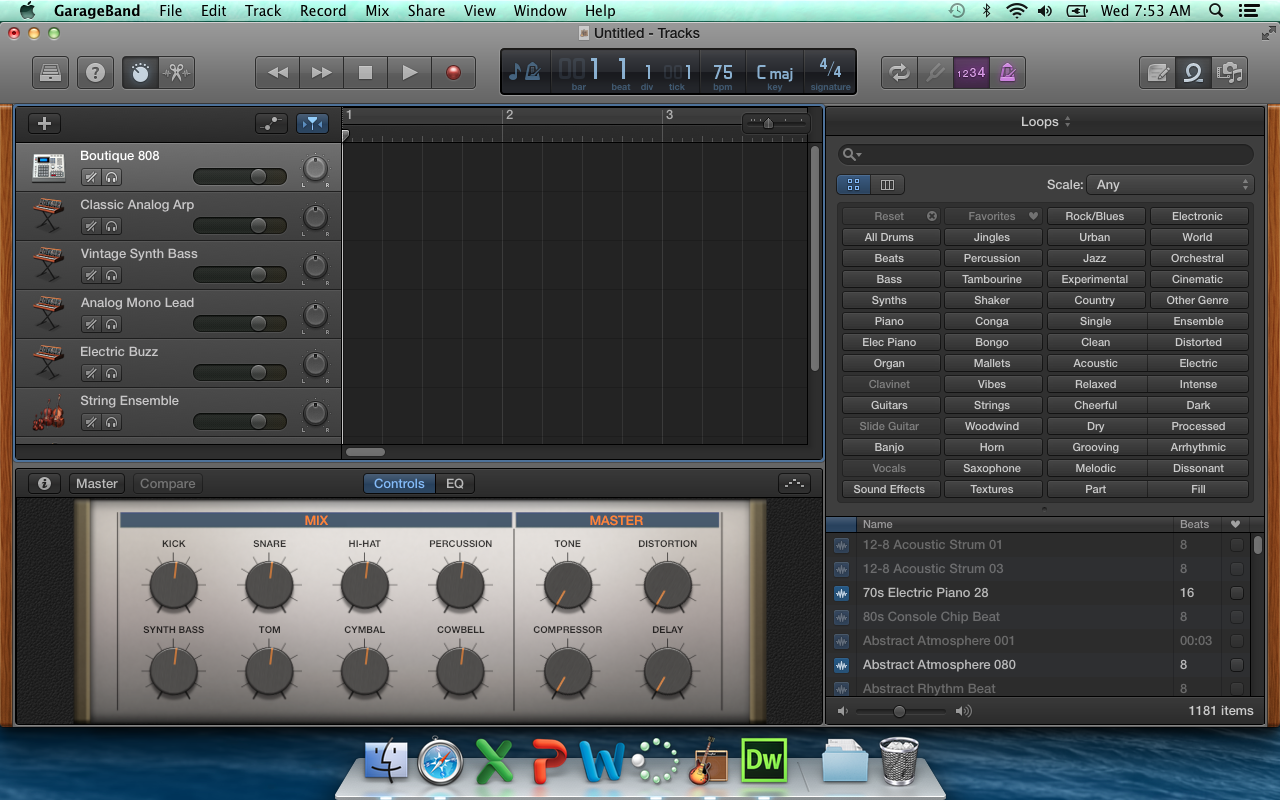 Step 2: Look at the loops available (highlighted) and you will drag them on to the big black area in the middle. But you have to go to the bottom of the group of tracks listed on the left.
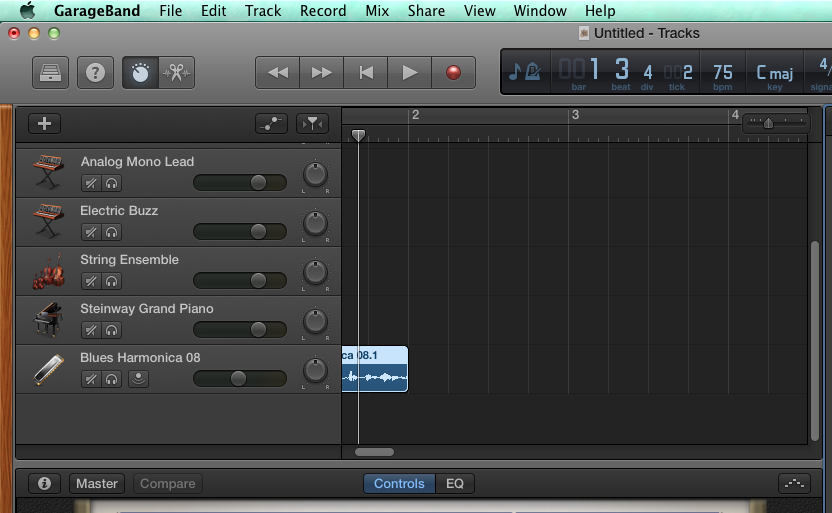
Step 3: See how I dragged a loop over but I had to scroll down on the tracks so that it would work. Now just start layering tracks. Have fun.
 Step 5: Be sure you give it the name of Period#_last_first_11x, choose MP3 as the format and remember where you saved it. Put the MP3 into the Mr. Komar Dropbox.
Submit an MP3 15seconds max!
Your teacher will come around and give you 10 points for a cleaned up computer. All files you need in the Documents folder and all files cleaned off of the Desktop/Download folder.
Your teacher will also give you 10 points for updating your "website".
You will experiment with Garageband to make your own 15 second MP3 music.
Step 3: See how I dragged a loop over but I had to scroll down on the tracks so that it would work. Now just start layering tracks. Have fun.

Wednesday, February 11, 2015
Exercise 10 - Paper Toy Design
100 Points
Due February 14
Class,

Due February 14
 |  |  |
|  | |
Your job is to make a PAPER TOY using Adobe Illustrator (or Photoshop) or a combination.

Here is an example of a good one if you feel like just a box:
Try making a self portrait, or a toy for a niece or nephew, or maybe something for your valentine!
Steps:
1. Find a template you like.
2. Save to your computer.
3. Open template in Illustrator and draw away. Use Photoshop if you want to bring in photos of other creatures.
If you want to make something using this template, here is how
1. Go to http://design.tutsplus.com/articles/design-a-custom-vectortuts-paper-toy-round-2--vector-5069 and see examples and how to fold it up when you are done drawing.
3. Open ZIP file and open the .AI file (the Adobe Illustrator File)
Submit your final paper cutout as a PDF and name it period#_lastname_firstname_10x
Wednesday, February 4, 2015
Exercise 9 : Haida / Zuni Tracing
Exercise 9
100 Points
Due 2/11
Native Art – Vector, Geometry and Symbol
In Adobe Illustrator make 2 drawings on one page. Choose one design from each of the following 3 groups and copy it as accurately as possible. For Extra Credit make your own design based on an animal of your choice.
1. Choose a Haida design to copy. Use the pen tool to trace the outlines and close your shapes to fill with color.
2. Choose a Zuni pot design and try to copy a piece of the pattern and repeat it across the page.
EXTRA CREDIT: Make your own design for the 3RD drawing -- using what ever style you want. If you want to make your own in a Haida influence, or your own rug design, or your own pottery motif -- be creative!
YOU WILL FIND THE ORIGINAL IMAGES TO TRACE IN THE SHARED FOLDER.
Haida / Tlingit Images


Zuni Pottery Designs


HERE IS AN EXAMPLE OF A STUDENT ZUNI COPY:

Further reading
Haida and Tlingit
http://www.ccthita.org/
http://en.wikipedia.org/wiki/Haida
Zuni
http://www.ashiwi.org/
http://en.wikipedia.org/wiki/Zuni_Pueblo,_New_Mexico
100 Points
Due 2/11
Native Art – Vector, Geometry and Symbol
In Adobe Illustrator make 2 drawings on one page. Choose one design from each of the following 3 groups and copy it as accurately as possible. For Extra Credit make your own design based on an animal of your choice.
1. Choose a Haida design to copy. Use the pen tool to trace the outlines and close your shapes to fill with color.
2. Choose a Zuni pot design and try to copy a piece of the pattern and repeat it across the page.
EXTRA CREDIT: Make your own design for the 3RD drawing -- using what ever style you want. If you want to make your own in a Haida influence, or your own rug design, or your own pottery motif -- be creative!
YOU WILL FIND THE ORIGINAL IMAGES TO TRACE IN THE SHARED FOLDER.
Haida / Tlingit Images


HERE IS AN EXAMPLE OF A STUDENT ZUNI COPY:

Further reading
Haida and Tlingit
http://www.ccthita.org/
http://en.wikipedia.org/wiki/Haida
Zuni
http://www.ashiwi.org/
http://en.wikipedia.org/wiki/Zuni_Pueblo,_New_Mexico
Tuesday, February 3, 2015
Exercise 8 - Return to Illustrator : Video Game for Pen Tool Practice
We are going to return to Adobe Illustrator.
To prepare for some of the upcoming exercises. Let us review how to use the Pen tool in Illustrator.
First, go make a landscape (you did this before) and then go try to save Weber!
2 Parts:
Part 1 -
25 Points
Redo "Landscape" Tutorial (remember this one?)
Show the final picture to Teacher for 25 Points

|
Exercise 1: Land
25 Points
Due End of Class (2/3 - per. 2, 4 and 2/4 - per. 1, 5, 7)
Show the Teacher you completed for 25 Points.

Subscribe to:
Posts (Atom)